If you play +1 Speed Keyboard Escape Candy and Chocolate, then you already know how useful a good code can be. Instead of spending a lot of time working hard in the game to earn speed and rewards, a speed keyboard escape candy and chocolate code lets you get a bonus right away, without any extra effort.
On this page, you will find all the codes that are working right now, a simple guide on how to use them, and easy ways to always know when new codes come out.
All Speed Keyboard Escape Candy and Chocolate Codes
Active Codes
Since the Discord social code isn’t working right now, here are public codes for everyone to use.
| Code | Reward |
|---|---|
| SAMMYLOOSER | Strawberry Milkshake |
| STEAKTREADMILL | Treadmill skin |
| BYP4SS1 | +15,000 speed |
Expired codes
Here are the expired +1 Speed Keyboard Escape codes.
- CHOCO2026
- 2026
How to Redeem Speed Keyboard Escape Candy and Chocolate Code
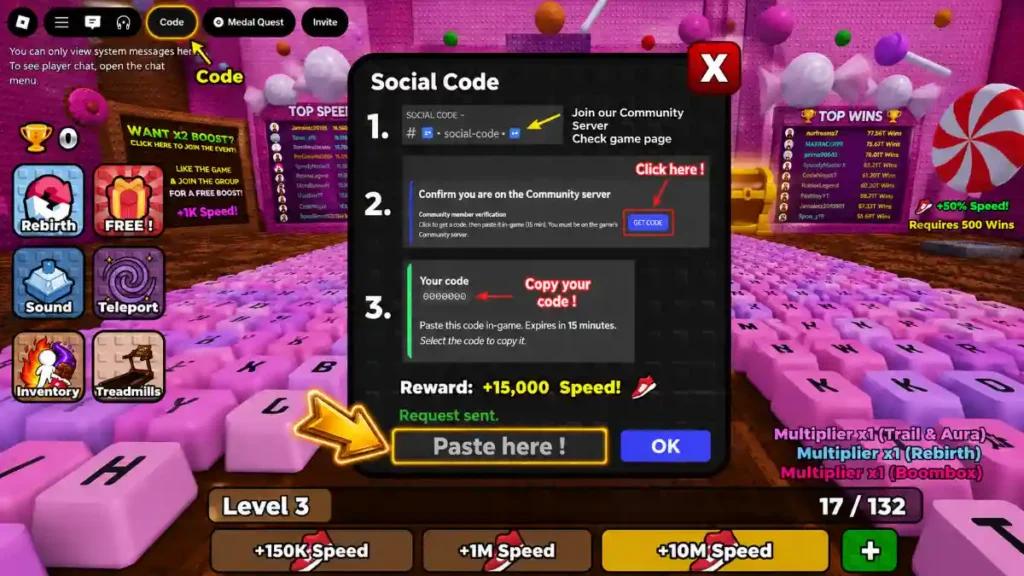
Even if you’ve used codes in other Roblox games before, it’s still helpful to read through the exact steps for this specific game so you don’t get confused or skip anything important.
Just follow these steps one by one:
- Join the +1 Speed Keyboard Escape Discord server.
This is the main place where players get social codes and find out about new updates. - Open the “social-code” channel.
This is a special channel inside the Discord server that is made just for creating codes for players. - Click the “Get Code” button.
When you click this button, the Discord bot will create a unique code that is connected to your Roblox account. This social code also gives you 15,000 Speed when redeemed. - Open +1 Speed Keyboard Escape in Roblox.
Start the game the same way you always do. - Find the “Code” button on your screen.
You’ll usually see it in the top-left corner of the screen, close to the Roblox menu. - Type or paste your code into the text box.
Be very careful here, every letter, number, and capital letter must match exactly. - Press “OK” to confirm.
If your code is correct and still working, the game will give you the reward right away. You don’t need to restart the game or leave and come back for it to show up.
This same process works for both the public code BYP4SS1 and for personal social codes that you get through the Discord server.
How to Get More Speed Keyboard Escape Candy and Chocolate Codes
Codes are not the only way to earn free speed in this game. There are a few other easy things you can do to get bonus speed without grinding:
- Bookmark this page.
Whenever codes are updated, you can come straight back here instead of looking all over the internet. - Get your personal social code from Discord.
By joining the official SecretVerse Studio Discord server and going to the social-code channel, you can generate a unique code tied to your Roblox account. This gives you an extra 15,000 Speed for free. - Join the SecretVerse Studio Roblox group.
Simply joining the official developer group rewards you with an additional 15,000 Speed. It’s free and takes only a few seconds. - Like the game on Roblox.
Pressing the like button on the game’s Roblox page also gives you 15,000 Speed as a bonus reward. - Stay active in the official Discord server.
New public codes usually show up there first, especially when there’s a big update, a special event, or a new world added to the game.
By doing all of these things together, you can collect a good amount of free speed very early in the game, which makes the early stages much easier and faster to get through.
Why Your Code Might Not Work
When a code doesn’t work, it’s easy to think something is broken in the game. But most of the time, the reason is something small and simple. Here are the most common causes, explained in a clear and easy way:
- You typed it wrong or copied it incorrectly
Even one wrong letter or number is enough for the game to reject the code. To avoid this, always copy and paste the code directly from a trusted source instead of typing it by hand. - The code has expired
Some codes are only available for a short window of time. After that window closes, the game still recognizes the format of the code, but it won’t accept it anymore. - Uppercase and lowercase letters matter
Codes are usually case-sensitive, which means “BYP4SS1” and “byp4ss1” are treated as completely different codes. Even one wrong capital letter can cause the code to fail. - A temporary server or connection problem
Sometimes the game has a short-term issue that stops it from reading your code properly. If this happens, try closing the game completely, rejoining, and then entering the code one more time. - You’ve already used the code on your account
Most codes, including social codes, can only be used once per account. Once you’ve already claimed the reward, entering the same code again won’t do anything.
Check Out Also: All New Roblox Game Codes