Waking up to find your Roblox account hacked is a nightmare no player wants to face. Your Robux drained, your limiteds traded away, your password changed, and suddenly you are locked out of an account you have spent years building. If that is where you are right now, take a deep breath. This updated 2026 guide walks you through exactly how to recover hacked Roblox account, step by step, whether you still have access to your email and phone or not. We also cover what to do if Roblox Support initially denies your request, how to clean your device so you do not get hacked again, and how to lock your account down once it is back in your hands.
Who Is This Guide For?
This guide works if you are dealing with any of the following situations:
- Your password was changed and you can no longer log in.
- The hacker changed your email and/or phone number, so the standard “Forgot Password” flow does not work.
- 2-Step Verification (2SV) was changed or enabled by the hacker, and it is now blocking your login.
- You are still logged in on one device (like your phone or a browser session) but cannot log in anywhere else.
- You never added an email or phone to the account, or you no longer have access to the ones that were linked.
No matter which of these applies to you, keep reading. We cover every path to getting your account back.
Steps to Recover Hacked Roblox Account
Step 1: Immediate Actions When You Suspect a Hack
The first few minutes after discovering a hack matter the most. Here is what to do right now.
Switch to a Clean Device
If you recently logged into Roblox on a device where you downloaded cheats, unknown scripts, “Roblox tools” from YouTube or Discord, or suspicious browser extensions, do not use that device for recovery. The malware or keylogger that compromised you in the first place could still be active. Move to a different, trusted computer or phone before doing anything else.
Try to Log In Immediately
If your password has not been changed yet, log in right away and head to Settings → Security (or Settings → Account on some devices). Change your password to something strong and unique before the hacker can lock you out.
If You Are Still Logged In on One Device
This is actually the fastest recovery path. If you still have an active session, maybe the Roblox app on your phone, or a browser tab that is still signed in, use that session immediately to:
- Change your password under Settings → Security.
- Update and verify your email address to one you fully control.
- Enable 2-Step Verification (2SV) using an authenticator app.
- Log out of all other sessions using the “Sign out of all other sessions” option in Security settings. This kills the hacker’s access instantly.
If you managed to do all of that, congratulations, you just recovered your account. Skip ahead to the “Securing Your Account After Recovery” section below to make sure it stays safe. If you could not log in at all, keep reading.
Step 2: Recover Your Account Using Email or Phone (Fastest Method)
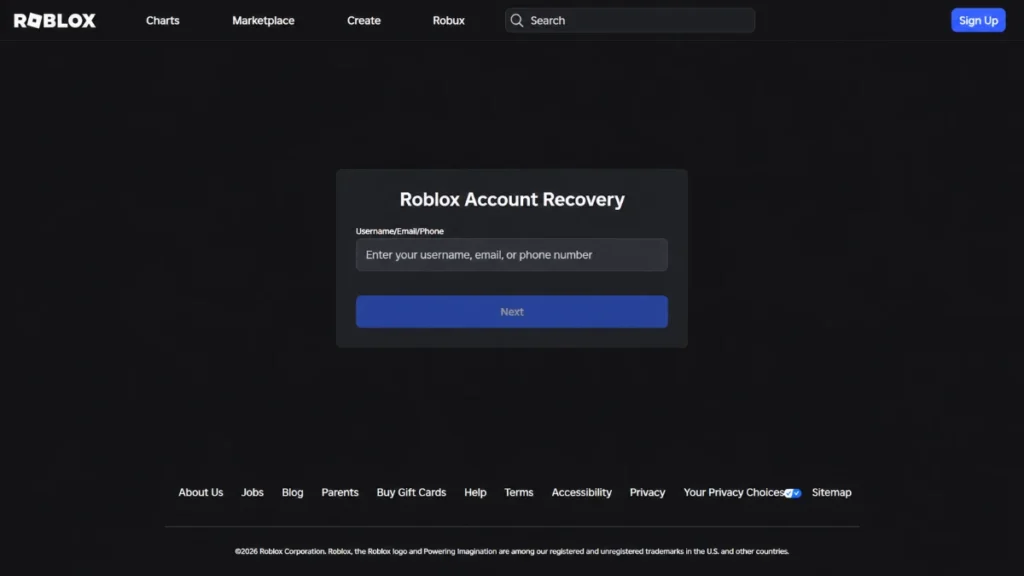
If you still have access to the email or phone number that was linked to your Roblox account, this is the fastest and easiest way to get back in.
Option A: Reset via Email
- Go to the Roblox login page and click “Forgot Password or Username?”
- Enter the email address linked to your account.
- Check your inbox (and spam folder) for a password reset link from Roblox.
- Click the link, set a new strong password, and log in.
Option B: Reset via Phone Number
- On the same Forgot Password page, switch to the Phone tab.
- Enter the phone number associated with your account.
- You will receive an SMS verification code. Enter it to reset your password.
Option C: One Method Lost, One Still Works
You do not need both email and phone to recover your account. You just need one. If the hacker changed your email but your phone number is still linked (or vice versa), use whichever method you still have access to. Once you are back in, immediately verify a new, secure email address so you are not locked out again.
After Regaining Access
As soon as you are logged in through the password reset:
- Change your password to something strong and unique (at least 12 characters, mix of letters, numbers, and symbols).
- Enable 2-Step Verification under Settings → Security.
- Log out of all other sessions to revoke the hacker’s access.
Step 3: What to Do When You Have No Access to Email or Phone
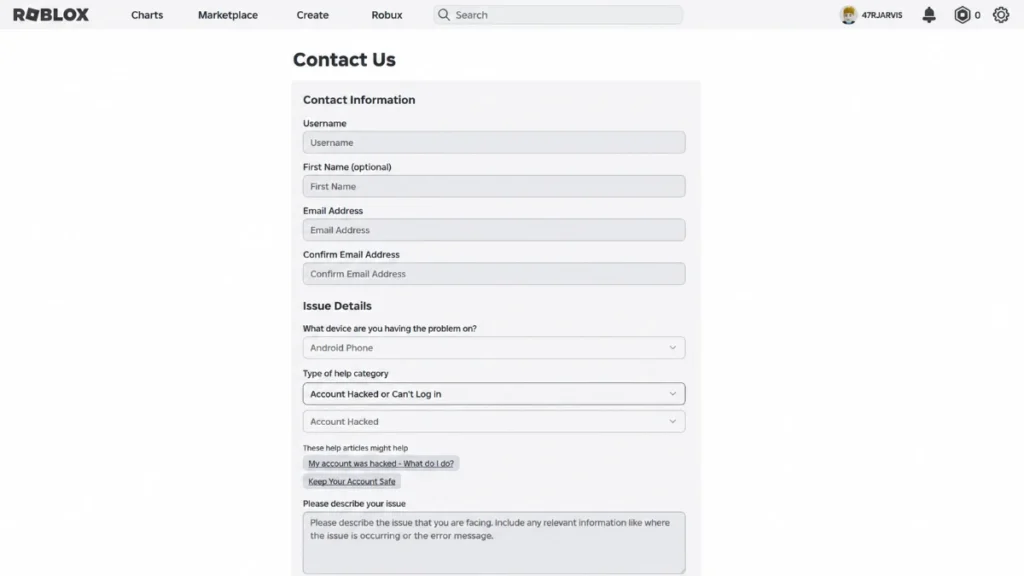
This is where most players get stuck, and it is the most common scenario when a hacker has done a thorough job. Do not panic. You can still recover your account through Roblox Support.
Contact Roblox Support Directly
You need to submit a request through the official Roblox Support form. Here is exactly how:
- Go to https://www.roblox.com/support or https://en.help.roblox.com.
- You can use any reachable email address as your contact email. It does not have to be the one linked to the hacked account. For players under 13, using a parent or guardian’s email is strongly recommended.
- Select your device type (PC, Mobile, Xbox, etc.).
- Under the help category, choose “Account Hacked” or “Can’t Log In.”
- Pick the most accurate subcategory: forgot password, lost 2-Step Verification, email/phone changed, or other login issue.
- Fill in your account details and submit.
Important: Never use third-party “recovery services” you find on Discord, YouTube, or social media. These are almost always scams that will steal even more of your information. Only use the official Roblox support channels.
What Proof of Ownership Does Roblox Want?
Roblox Support needs to verify that you are the real owner of the account. The more proof you can provide, the better your chances. Here is what carries the most weight, ranked by importance:
Strongest proof (provide these if you can):
- The original email address used when the account was created.
- Billing information and transaction details, which is often the most powerful proof. Include:
- Dates and amounts of Robux purchases, Premium subscriptions, or gift card redemptions.
- The last four digits of the credit/debit card used.
- PayPal transaction IDs or gift card codes.
- Receipts or confirmation emails from purchases.
Supporting proof (helpful but not always sufficient alone):
- Approximate account creation date and region/country.
- Old passwords you previously used on the account.
- Previous email addresses linked to the account.
- Display names and username history.
- Usernames of friends or frequent games you played.
- Groups the account owns or holds a leadership role in.
- Screenshots of the account profile, inventory, or purchase history.
How to Write Your Support Request
In the description field of your support ticket, write a clear, concise narrative that includes:
- When you noticed the hack (date and approximate time).
- What changed: password, email, phone, 2SV, items traded away, Robux spent.
- A clear statement that you did not authorize any of these changes or trades.
- That you can provide receipts, billing details, or other specific proof if requested.
Keep it straightforward and factual. Support agents process thousands of tickets, so a well-organized request gets faster results.
What If Roblox Support Says “Not Enough Information”?
This happens more often than you might expect, and it does not mean your case is over. Many players successfully recover their accounts on the second or third attempt. Here is what to do:
- Reply to the same email thread instead of opening a new ticket, which keeps your case history together.
- Provide additional details you may have missed:
- More specific purchase information (dig through your email for old receipts).
- Gift card codes or partial card numbers.
- Old email addresses you might have forgotten about.
- Specific details about games played, items owned, groups joined, or devices used.
- Be patient but persistent. Responses can take several days to over a week, and you may need multiple back-and-forth emails before your ownership is verified.
Set realistic expectations: this process is not instant, but it does work for the vast majority of legitimate account owners who provide enough evidence.
Step 4: Clean Your Device Before Logging Back In
Do not skip this step. If your account was hacked, there is a good chance your device is compromised. Logging back in on an infected device means the hacker can steal your new credentials immediately and you will be right back where you started.
Remove Malicious Software
- Uninstall any Roblox “cheats,” fake clients, exploit tools, or executors you downloaded from unofficial sources (YouTube videos, Discord servers, random websites).
- Remove suspicious browser extensions, especially anything related to Roblox scripts, “FPS unlockers,” “trading helpers,” or “Robux generators.”
- Check your browser’s extension list and remove anything you do not recognize or did not intentionally install.
Run a Full Malware Scan
- Use a reputable antivirus or anti-malware tool (Windows Defender, Malwarebytes, or similar) to run a full system scan.
- Quarantine or delete anything flagged as suspicious.
- If you are on mobile, check for unfamiliar apps that might have been sideloaded.
Clear Sessions and Cookies
If you suspect your Roblox session cookie was stolen (common in cookie-logging attacks):
- Log out of Roblox in all browsers.
- Clear all cookies and cached data for Roblox in your browser settings.
- Log back in using a clean browser with your new password. This invalidates any stolen session cookies, making them useless to the hacker.
Only after completing these cleanup steps should you log into your recovered account.
Step 5: Securing Your Account After Recovery
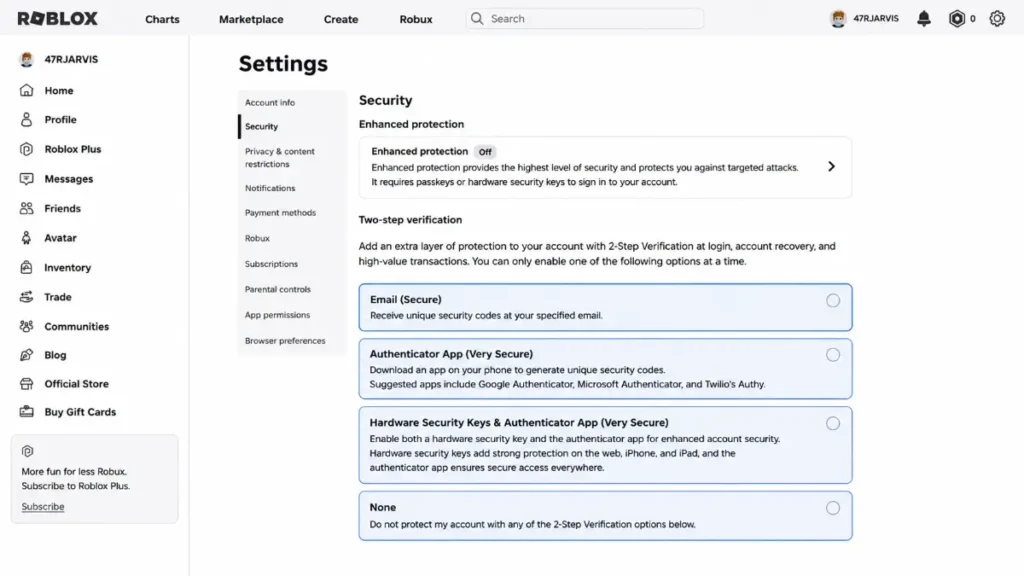
Getting your account back is only half the battle. Here is how to make sure it stays safe. These are the current best practices for 2026.
Set a Strong, Unique Password
- Use at least 12 characters with a mix of uppercase and lowercase letters, numbers, and symbols.
- Do not reuse passwords from other websites or games. If you use the same password on Roblox as your email, a breach on one site compromises both.
- Consider using a password manager (like Bitwarden, 1Password, or Google Password Manager) to generate and store strong passwords so you never have to memorize them.
Enable 2-Step Verification (2SV)
This is the single most important security step you can take.
- Go to Settings → Security.
- Enable 2-Step Verification.
- Choose your method:
- Authenticator app (Google Authenticator, Authy, Microsoft Authenticator). This is the recommended option. It is more secure than email-based 2SV because if your email gets compromised, your 2SV is still safe.
- Email-based 2SV, which is better than nothing but weaker if the hacker also has access to your email.
- Security key, the strongest option if you have a hardware key like a YubiKey.
Generate and Store Backup Codes
When you enable 2SV, Roblox allows you to generate recovery/backup codes in your Security settings. These one-time-use codes let you log in even if you lose access to your authenticator app.
- Store them safely. Write them down and keep them somewhere secure (not just on the same device).
- Consider keeping a copy in your password manager or in a locked physical location.
- Do not share them with anyone, ever.
Log Out of All Other Sessions
Go to Settings → Security and use the “Sign out of all other sessions” feature. This terminates every other active login, ensuring the hacker cannot maintain access through a lingering session.
Review and Clean Up Account Activity
Once your account is secure:
- Check recent trades. If the hacker traded away your limited items, report the unauthorized trades to Roblox Support.
- Review purchase history and look for unauthorized Robux spending or gift purchases.
- Check linked devices and social accounts and remove anything you do not recognize.
- Review your privacy and security settings to make sure nothing else was changed.
Special Cases and Edge Scenarios
Locked Out by 2-Step Verification / Lost Backup Codes
If the hacker enabled or changed 2SV on your account, or if you had 2SV enabled but lost both your authenticator app and backup codes:
- You will need to contact Roblox Support and treat this as a full account recovery case (follow the steps in Step 3 above).
- Roblox will require strong proof of ownership before they remove or reset 2SV, as this is a security measure to protect accounts.
- Be prepared to provide billing information, the original email, and other identifying details.
Under-13 Accounts and Parental Help
For younger players, account recovery is easier and safer with a parent or guardian’s involvement:
- Use a parent or guardian’s email address as the contact email when submitting a support ticket.
- Parents can help by providing billing information such as credit card details, gift card purchase receipts, or PayPal records.
- Once the account is recovered, parents should help set up:
- 2-Step Verification on the child’s account.
- A parent PIN in account settings to prevent unauthorized changes.
- Proper privacy settings appropriate for the child’s age.
When Recovery Is Not Possible
It is important to be honest about this: in some cases, account recovery may not be possible. This typically happens when:
- No recovery email or phone was ever added to the account.
- No purchases were ever made (so there is no billing proof).
- The account is very old and you cannot provide enough identifying details.
- Roblox Support cannot verify your ownership after multiple attempts.
If you find yourself in this situation:
- Create a new account and set it up with strong security from day one. Add an email, enable 2SV, and generate backup codes immediately.
- Inform your friends and group members that the old account is compromised and should be ignored or reported.
- Take it as a hard lesson and apply everything in this guide to protect your new account.
Preventing Future Hacks
Since this guide is focused on recovery, we will keep this section brief, but these habits are what separate players who get hacked once from players who never get hacked again.
- Never share your password, cookies, 2SV codes, or backup codes. Not with friends, not with anyone claiming to be a Roblox admin, not with “support” reaching out through Discord or in-game chat. Roblox staff will never ask for your password.
- Avoid third-party scripts, exploits, and “Roblox tools” from YouTube, Discord, or TikTok. These are the number one vector for account theft in 2026, and many of them contain cookie loggers or keyloggers.
- Only log in on the official Roblox website (roblox.com) or the official app. Always double-check the URL before entering your credentials. Phishing sites often use lookalike domains like “rob1ox.com” or “roblox-login.com.”
- Regularly review your email and security settings to catch unauthorized changes early.
- Use unique passwords for your Roblox account and your email. If both share a password, one breach compromises everything.
For a deeper look at how scammers target Roblox players in 2026, check out our companion article: Every Roblox Scam Explained in 2026.
Frequently Asked Questions
How long does it take Roblox Support to respond?
Initial responses usually arrive within 1 to 3 business days, but complex account recovery cases can take a week or more, especially if multiple rounds of verification are needed.
Can I get my stolen items back?
Roblox may be able to restore items that were traded away without your authorization, but this is handled on a case-by-case basis. Report the unauthorized trades in your support ticket and provide as much detail as possible.
Will Roblox ban my account if it was used for scamming while hacked?
If your hacked account was used by the hacker to scam others or violate Terms of Service, explain this in your support ticket. Roblox typically investigates and can distinguish between account owner activity and unauthorized access, especially if you report the hack promptly.
Is it safe to use “account recovery services” on Discord?
Absolutely not. Any person or service claiming to recover your Roblox account outside of official channels is a scam. They will ask for personal information, money, or both, and you will end up worse off than before.
I never added an email to my account. Can I still recover it?
Yes, but it will require going through Roblox Support and providing proof of ownership (billing info, old passwords, account details). The more information you can provide, the better your chances. Going forward, always add and verify an email address on every account you create.
Final Thoughts
Getting hacked is stressful, but most Roblox accounts can be recovered if you act quickly and follow the right steps. Whether you can reset your password through email or phone, or you need to go through Roblox Support with proof of ownership, the process works. It just takes patience and persistence.
The most important takeaway? Once your account is back, lock it down properly. Enable 2-Step Verification with an authenticator app, use a unique strong password, save your backup codes, and never share your credentials with anyone. Prevention is always easier than recovery.